
If your website runs on PHP, there is a good chance it needs an urgent update this week. Two critical flaws in PHP itself, nicknamed PHP2Shell vulnerability, can let an attacker with no password run their own code on your web server, just by sending it specially crafted web requests. The PHP project fixed them on 21 October 2026. Attackers did not wait for the fix.
Amazon’s threat intelligence team recorded an exploitation attempt on 17 October, four days before public disclosure. Cloudflare saw attacks begin hours before the patches were released. This guide explains what PHP2Shell vulnerability means for a business owner, how to find out in minutes whether you are exposed, and exactly what to do today.
Quick answer
- Am I affected? Almost certainly, if your site runs on PHP. WordPress, WooCommerce, PrestaShop, Magento and most custom business applications do.
- Which versions are fixed? PHP 8.5.12, 8.4.27, 8.3.36 and 8.2.35. PHP 8.1 and older have no official fix.
- What do I do today? Find your PHP version, get your host or developer to update it, and ask for written confirmation.
Not sure where you stand? Request a free PHP2Shell vulnerability audit and update plan.
What Is PHP2Shell vulnerability, in Plain English?
PHP is the programming language behind a huge share of the web. WordPress, WooCommerce, PrestaShop and Magento are all built on it. When someone visits your website, PHP is the engine that builds the page.
PHP2Shell vulnerability is the nickname for two separate flaws in that engine:
- CVE-2026-109618: a memory-handling bug triggered when the server runs out of memory partway through reading a request.
- CVE-2026-109619: a bug where leftover data from one request is wrongly reused by a later request on the same server process.
The PHP project describes both as capable of unauthenticated remote code execution. In plain terms, a stranger on the internet could make your server run commands, as the user account PHP runs under, without logging in. Both are rated 9.2 out of 10 (Critical) on CVSS v4.0, the standard severity scale for security flaws (see the first and second advisories). PHP’s own advisories do not use the name “PHP2Shel vulnerabilityl”. It is the name the security industry and press have adopted.
The flaws can also expose server memory. According to Sansec, a security firm that specialises in online stores, leaked memory could include passwords, session tokens, API keys and even TLS private keys from other visitors’ requests.
Why This Is Urgent
Most vulnerability warnings never turn into real attacks against small businesses. This one already has attempts on record:
- 17 October 2026: Amazon Threat Intelligence recorded a PHP2Shell vulnerability exploitation attempt on its honeypot (decoy server) network, four days before public disclosure. Amazon says it is unclear whether such attempts would have worked on real systems.
- 21 October 2026: Cloudflare reported early attacks at 07:43 UTC, before the 14:00 UTC release of the fixes, according to Sansec.
- 21 October 2026: security firm watchTowr reported that its own decoy servers had observed exploitation of both flaws in the wild.
- 21 October 2026: the NCSC issued an alert stating that organisations using any version of PHP are affected.
There is a second reason for speed. Exploit code spreads fast. Amazon identified several proof-of-concept exploits (demonstration attack code) circulating on release day, the earliest around 02:00 UTC, twelve hours before the fixes were public. Every day you wait is a day your site is a known target.
Not sure which of your sites run PHP? Request a free PHP2Shell vulnerability audit and update plan.
The Honest Picture: Urgent, But Not Hopeless
We would rather you act calmly and quickly than panic.
PHP’s own advisory confirms a working attack against Apache with mod_php (a common way hosts run PHP), where a single unauthenticated request can trigger the problem before any of your website’s code runs. For PHP-FPM (the other common way), the advisory says one of the flaws looks susceptible from source analysis, and a session-related attack on the other has been demonstrated. Attacks are not guaranteed to work everywhere: reliability depends on the server build, extensions and configuration.
Sansec’s update of 22 October also says mass exploitation is “less likely than we expected on release day”, because an attack “needs specific knowledge of the target server and specific conditions on it”. A researcher it cites found that the public exploits did not work against a default PHP installation.
That is reassuring, but it is not a reason to wait. Determined attackers can often find the conditions they need, and exploit code improves quickly. Sansec says you do not need to take your store offline, but you should update PHP as soon as possible. The PHP project is clear that updating is the only complete fix.
Is Your Website Affected?
If your site runs on PHP, assume yes until you have confirmed otherwise. The NCSC specifically warns organisations not to limit their checks to old PHP versions, because supported versions are affected until they are patched.
Common PHP-based platforms include:
- WordPress and WooCommerce
- PrestaShop (see our PS services)
- Magento and Shopware
- Joomla and Drupal
- Symfony and Laravel
- Custom-built business web applications
Here is the part that catches many owners out: updating WordPress, your plugins or your theme does not update PHP. PHP lives on your server, and your hosting provider or developer controls it. Because the attack can run before WordPress even loads, a security plugin cannot reliably stop it. Your website’s own code can be perfectly clean and still be exposed.
WordPress itself is a separate matter. Its 17 July 2026 security release fixed one critical and one high severity issue (CVE-2026-60137 and CVE-2026-63030), and WordPress.org forced automatic updates for affected versions. Check that your site is on the latest WordPress as well as the latest PHP.
The Fixed PHP Versions
PHP released security fixes for four supported versions on 21 October 2026. You need to be on that version or newer.
| Your PHP branch | Fixed version | Status |
|---|---|---|
| PHP 8.5 | 8.5.12 | Supported |
| PHP 8.4 | 8.4.27 | Supported |
| PHP 8.3 | 8.3.36 | Supported |
| PHP 8.2 | 8.2.35 | Supported until 31 December 2026 |
| PHP 8.1 and older | No official release | Needs a vendor backport or an upgrade |
Note the PHP 8.2 end date. If you are on 8.2, patch now, then plan a move to 8.3 or 8.4 before the year ends.
How to Check Your PHP Version in Five Minutes
You do not need to be technical for this first step.

- WordPress users: log in, go to Tools, then Site Health, then the Info tab, and expand the Server section. Your PHP version is listed there. (WordPress’s own guide)
- Hosting control panel users: look for a section called PHP Settings, MultiPHP Manager or Select PHP Version.
- Anyone else: ask whoever built or hosts your website to tell you the exact PHP version and whether it includes the 21 October fixes.
Be careful with what that number means. Sansec points out that a fixed package from a Linux provider keeps its old version number. AlmaLinux gives the same warning for its packages: the fixes are backported, so php -v is not a reliable check. A version number alone cannot always prove you are safe, which is why you should ask your host to confirm in writing.
What to Do Today: A Five-Step Action Plan
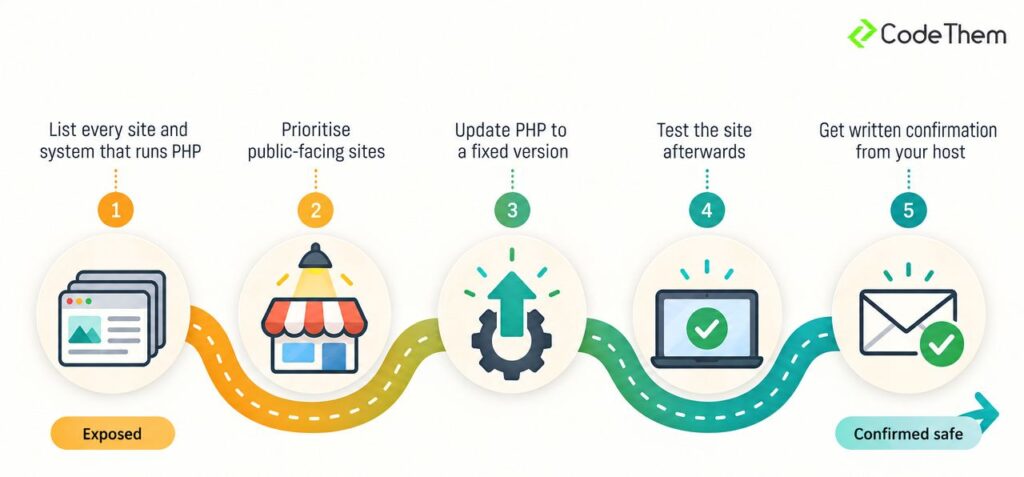
Steps 1 to 3 follow the NCSC’s recommended priorities, translated for a business owner. Steps 4 and 5 are our own advice.
- List every site and system that runs PHP. Include your main website, your online shop, any old microsites, staging copies and any customer portals. Forgotten sites are the ones that get hacked.
- Prioritise anything public-facing. The NCSC says to update internet-facing systems first, then internal ones. Your online shop and any site that takes payments or customer details come first.
- Update PHP to a fixed version. On shared hosting, this is usually a setting in your control panel or a request to your host. On a VPS or dedicated server, it means updating the PHP packages and restarting PHP. Until PHP is restarted, running processes may still be using the old, vulnerable code.
- Back up, then test. Take a backup before you update. Afterwards, check your contact forms, checkout and login. Older plugins sometimes break on a newer PHP release, so test a copy first if you are jumping several versions.
- Get written confirmation from your host. Ask them: “Has the server serving our website been updated to include the fixes for CVE-2026-109618 and CVE-2026-109619, and has PHP been restarted?” Keep their reply.
One more setting to ask about. On 23 October, PHP published a separate advisory on a related, less likely issue (CVE-2026-115560) that the 21 October releases do not fix, according to Cloudflare. PHP suggests switching off its session upload progress feature (session.upload_progress.enabled=0) until the next regular release. PHP says the issue needs an unusual combination of configuration and application code. Ask your host to apply the setting as well as the update.
If You Run PHP 8.1 or Older
This is the highest-risk group. The PHP project no longer releases fixes for PHP 8.1 and earlier, and the vulnerable code goes back a long way. Sansec reports that it dates to PHP 5.4.0, released in 2012.
You have three options:
- Upgrade to a supported version such as PHP 8.3 or 8.4. This is the best long-term answer but needs testing.
- Use a vendor backport. Some Linux distributions and paid long-term support providers have released fixes for older versions. Ask your host or server administrator whether they have, and which package to install.
- Build from PHP’s source backports. PHP’s security team published minimal patches for 7.4, 8.0 and 8.1. This is for experienced administrators only.
For many small businesses, an old PHP version also means an old website, old plugins and old themes. This is where an upgrade plan matters most. Our website maintenance and support package cover how to prevent that.
A Real Example: Patching PHP 7.2 Today
Today we updated a client’s SaaS application that still runs on PHP 7.2. That is well below the versions PHP supports, and PHP’s own source patches only cover 7.4, 8.0 and 8.1, so the fix had to come from a Linux vendor. AlmaLinux published official patched packages for its PHP 7.2 stream on 21 October.
The application runs in Docker on a Debian-based image. To use AlmaLinux’s official patch, we had to switch the base image from Debian to AlmaLinux. That was not a one-line change. We also needed a separate php-imap package and our own patched magic.mgc file (the database PHP uses to detect file types).
The work took a few hours and went smoothly, but only because we then tested the application extensively to make sure the different base image did not break anything.
What this taught us:
- Containers carry their own PHP. If your application runs in Docker, updating the server underneath does nothing. The fix goes into the image, and the container must be rebuilt and redeployed.
- Changing the base image is a real change, not a patch. Everything underneath PHP changes with it, so budget time to test the whole application.
- A patched old version buys time, not safety. AlmaLinux notes that its PHP 7.2 stream is past its life cycle, that future fixes are not guaranteed, and recommends moving to a supported version.
Ask your developer or host whether PHP runs directly on the server or inside a container image.
Cannot Update Today? Temporary Measures and Their Limits
PHP publishes temporary mitigations, but is clear that they “reduce exposure to specific attack paths but do not make an installation safe”. Examples include switching off the session upload progress feature, tightening request size limits and, on some setups, blocking file-upload style requests at the web server.
These changes need to be made in server-level configuration, not in your website’s settings, and some can break features such as file uploads or checkout forms. Treat them as a bridge for hours or days, not a fix. If you cannot apply them or cannot update quickly, the NCSC says to consider taking the affected system offline until it can be fully mitigated. However, the PHP update is possible in most situations. Contact us for a free PHP2Shell vulnerability audit – we will asses your situation and advise the best move.
Signs Your Site May Already Be Compromised
Because attempts began before the patch existed, it is sensible to check. Amazon advises investigating from at least 17 October, not just from the disclosure date. The NCSC advises checking for signs of compromise and backdoors, and using an NCSC-assured Cyber Incident Response provider if you do not have the confidence to do it yourself.
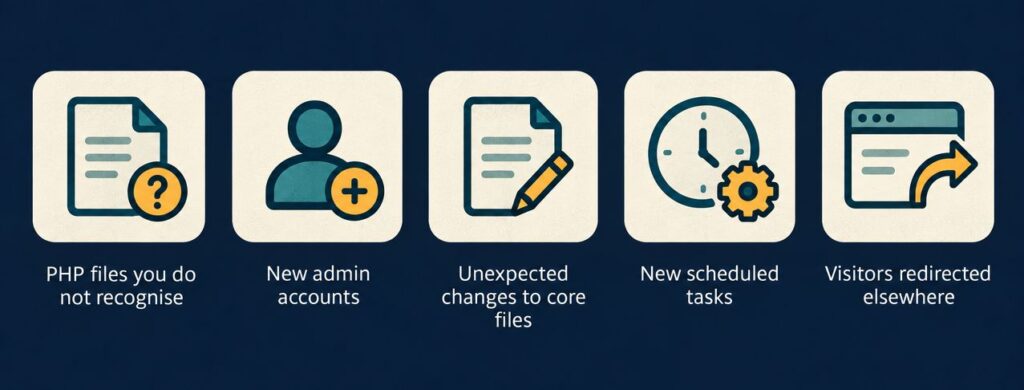
Warning signs include:
- PHP files in your uploads or web folders that you do not recognise
- New administrator accounts nobody on your team created
- Unexpected changes to core website files
- New scheduled tasks (cron jobs) on the server
- Your site redirecting visitors elsewhere, or search results showing odd pages for your domain
Your developer or host can also review the web server logs for unusual requests and check for unexpected file changes or processes, as Amazon recommends. PHP’s own advisory adds a caution: clean logs do not prove you are safe. If something looks wrong, do not simply delete the file. Preserve the evidence, then get help.
After you patch: if your server was unpatched and reachable from the internet at any point after 17 October, it is sensible to change your hosting, admin and API passwords once the update is in. Sansec warns that the memory flaw can expose secrets of this kind. This is our own precaution, not an official requirement.
The Legal Side: Why a Breach Is More Than an IT Problem
If an attacker reaches personal data on your server, such as customer names, addresses or order histories, you may have to report it. The ICO states that you must report a notifiable breach “without undue delay, but not later than 72 hours after becoming aware of it”. If the breach poses a high risk to the people affected, you must also tell them directly.
That clock starts when you become aware, so knowing your exposure now is far better than discovering it later. A prompt patch is usually far cheaper than the downtime, clean-up and reputation damage that follow a hacked website.
Frequently Asked Questions
Does updating WordPress fix PHP2Shell vulnerability? No. PHP runs on your server and is updated separately from WordPress, your plugins and your theme. Cloudflare makes the same point: updating website code or a plugin alone does not fix these vulnerabilities.
Does Cloudflare protect me? Partly. Cloudflare says its managed WAF protection started on 21 October at 03:02 UTC for free and paid plans, but it only covers traffic that passes through Cloudflare, and it tells customers to patch PHP even with the protection in place.
Should I take my website offline? Sansec says you do not need to take your store offline, but you should update PHP anyway. The NCSC says to consider taking a system offline if it cannot be updated or mitigated in time, until it is fully mitigated.
My host says PHP is updated, but the version number looks old. Is that right? It can be. A fixed package from a Linux provider can keep its old version number, according to Sansec. Ask your host to confirm in writing that the fixes for both CVEs are included and that PHP has been restarted.
How do I know if my site has already been hacked? You cannot tell from outside. Check for the warning signs above, have your developer or host review the logs from 17 October, and remember that clean logs do not prove safety.
Get a Free Audit and Update Plan
You do not have to work through this alone. We are offering businesses a free PHP2Shell audit and update plan. We are a Staffordshire digital agency working with businesses across the UK. Security audits and malware removal are part of our website security services.
We will work out which PHP version each of your websites and systems is running, whether it is exposed to CVE-2026-109618 and CVE-2026-109619, and what needs to change. You will receive a clear, prioritised plan in plain English: what to update first, whether your host needs to act, what could break, and what to do if you are still on PHP 8.1 or older. There is no obligation.
The sooner you check, the sooner you can stop worrying about it.
For a free PHP2Shell vulnerability audit, contact us or call +44 (0) 7512 808928.
Quick Recap
- PHP2Shell vulnerability is two critical PHP flaws (CVE-2026-109618 and CVE-2026-109619), both rated 9.2 Critical, that can allow unauthenticated remote code execution.
- Exploitation attempts began before the 21 October fix, so this is a live threat, even though some public exploit code reportedly fails against default setups.
- Updating WordPress or plugins does not fix it. PHP itself must be updated on your server, or in your container image.
- Fixed versions are 8.5.12, 8.4.27, 8.3.36 and 8.2.35. PHP 8.1 and older need an upgrade or a vendor backport.
- Ask your host for written confirmation, switch off session upload progress as PHP suggests, check for signs of compromise, and act today.
Ready to check? Contact us for your free PHP2Shell vulnerability audit and update plan.